Skip to content
Care Team Budget PlannerNavigator guide

Use the planner

Funding

OutcomeCurrent and Proposed funding are set, and the monthly funding on the dashboard matches them.

Use the planner · 1 of 4

Funding has one job: the external funding envelope, plus the reserve settings that both plans share.

  1. Step 1

    Enter the Current rate and hours

    What to do

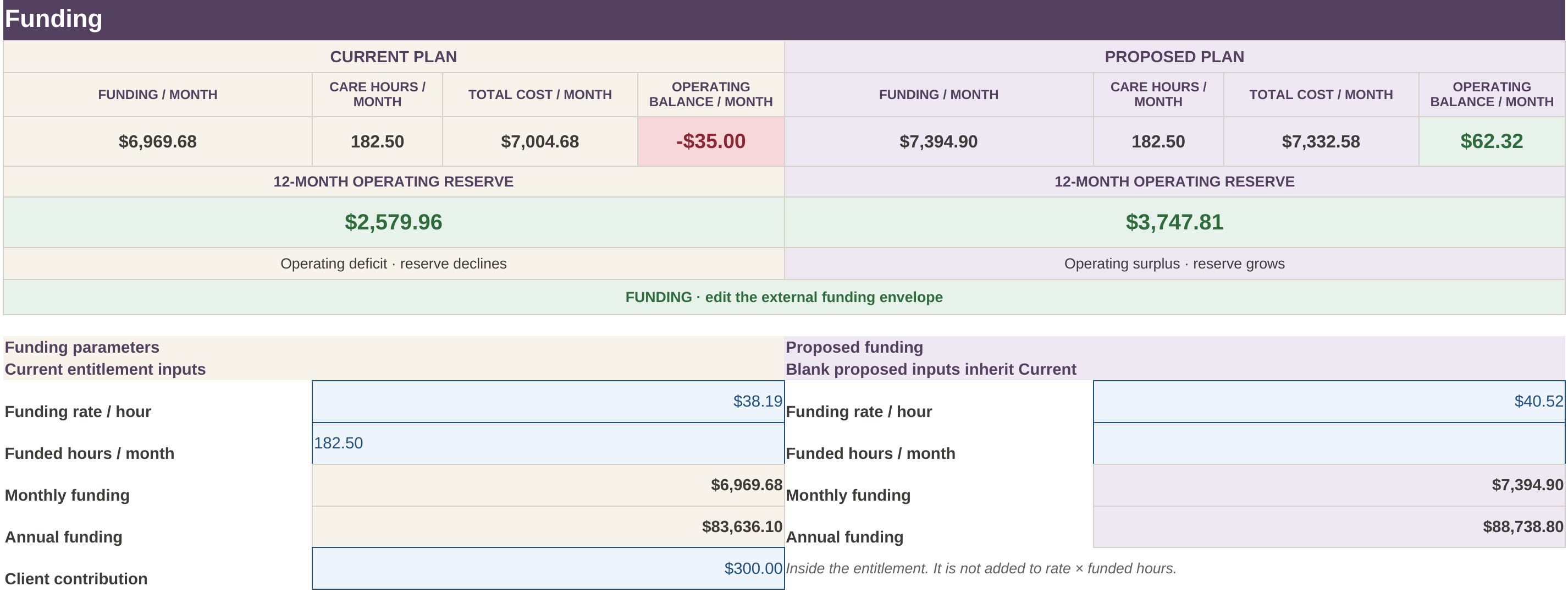
    On Funding, enter the funding rate per hour and the funded hours for the month.

    What it means

    Monthly funding is that rate times those hours. It is the full entitlement. $300.00 client contribution, inside the entitlement.
  2. Step 2

    Leave Proposed blank, or type a change

    What to do

    Proposed rate and Proposed hours start blank. Type a number only when the proposal changes that figure. Type 0 when the proposal is zero.

    What it means

    Blank inherits Current. In the example, Proposed funding rate is $40.52 per hour and Proposed hours are blank, so the hours stay at 182.5 funded hours per month.

    Watch for this

    Funded hours and planned care hours are independent. A plan can show 200 funded hours and 220 planned care hours. That does not clamp the care hours, and it does not automatically mean the budget fails.

  3. Step 3

    Set the shared reserve

    What to do

    Enter the opening operating reserve and the monthly growth the employer wants. Mark the review only after you have looked at the expenses and the reserve.

    What it means

    These settings are not a fourth plan. They apply to Current and Proposed together. Desired reserve growth is not an operating expense.

    The example opens with $3,000.00 and $200.00 desired monthly reserve growth.

  4. Step 4

    Read the dashboard

    What to do

    Read Funding / month, Care hours / month, Total cost / month, Operating balance / month, and the 12-month operating reserve. Current is on the left. Proposed is on the right.

    What it means

    The same dashboard is on Care Team, Expenses, and Client Review. Editing funding updates it everywhere.

    How hours, the balance, and reserve growth stay separate

    FundingSynthetic example DEMO-6H. Current funding is $38.19 per hour for 182.5 funded hours per month. Proposed funding rate is $40.52 per hour. Proposed hours are blank.
    Funding sheet of the synthetic 6-hour example. The dashboard shows Current and Proposed side by side. Current funding is $38.19 an hour for 182.5 hours. Proposed funding rate is $40.52, and Proposed hours are blank.

    Open full-size screenshot of the Funding sheet